LeafBound Updates
See what's new on LeafBound, from new survival features to quality-of-life improvements.
Latest Highlights
The newest additions to LeafBound — built to make survival smoother without ever touching pay-to-win.
Soulbound Relic & Shrine
Craft a relic, bring it to the shrine atop the Great Tree, and bind an item beyond death.
Player Mailboxes
Create a protected mailbox in your claim with a single sign. Anyone can deliver — only you can collect.
Woolevators
Simple player-built vertical elevators — jump to go up, sneak to go down, powered by experience.
Trusted VeinMiner
A quality-of-life reward for Trusted players: clear natural ore veins and trees in one satisfying sweep.
Two-Way Discord Chat
Chat with players in-game straight from Discord — one identity, both platforms, fully filtered.
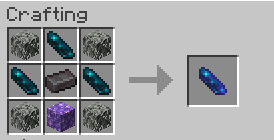
The Blank Leafbound Relic
Soulbound Relic & Shrine
Craft a Blank Leafbound Relic, then bring it to the shrine at the top of the Great Tree at spawn. Right-click the shrine to transform it into a Soulbound Book and bind your chosen item beyond death.
- 1Craft a Blank Leafbound Relic
- 2Bring it to the shrine at the top of the Great Tree at spawn
- 3Right-click the shrine with the relic
- 4Receive a Soulbound Book
- 5Use it to keep a valuable item on death
The Great Tree remembers every traveler who binds an item beneath its branches. Items marked by the tree remain connected to their owner, even beyond death.
What Soulbound does
Stays with you on death
Does not drop
Does not enter a Death Chest
Only leaves your inventory if you drop it, or it breaks
Death Chests Are Now Live
Dying no longer means watching every item scatter across the ground. When you die, your inventory is stored inside a private, protected Death Chest for up to one hour.
How it works
- The chest's dimension and coordinates are shown in chat.
- Only the owner can reclaim the chest.
- Death Chests are enabled by default.
- Your first three chests within a rolling 24-hour period are free.
- The next two cost one diamond each to reclaim.
- After the five-chest limit, items drop normally until the rolling window clears.
- When a chest expires, any remaining contents drop at its location.
Commands
- /dc status
- View current usage and active chests
- /dc locate
- Find your newest active chest
- /dc off
- Use normal item drops instead
- /dc on
- Enable Death Chests again
🏡 Claim protection
Death Chests respect land claims. If you die inside another player's protected claim, LeafBound attempts to move your Death Chest to a safe nearby location outside the claim.
Player Mailboxes
Claim owners can create a mailbox by placing a sign inside their own claim with [Mailbox] on it. The sign activates automatically and behaves like a protected 27-slot single chest.
Mailbox rules
- Only the claim owner may create a mailbox.
- A mailbox sign placed outside a claim breaks and returns to you.
- Any verified player may place items inside another player's mailbox.
- Only the mailbox owner may remove items.
- Each sender may occupy up to six mailbox slots.
- The sign displays how many of the 27 slots are currently filled.
- If a mailbox is broken, all stored contents drop at its location.
Deliveries and notifications
When an item is delivered while you're online, you'll see: "An item has been placed in your mailbox." The notification doesn't reveal the sender or the item — a little mystery is part of the fun.
When you remove a delivered stack, you'll see who it came from, for example: "PlayerA has given you x32 Diamonds."
Place a sign in your claim
Write on line 1:
[Mailbox]
It becomes:
[Mailbox]
PlayerName
0 / 27
Woolevators
Woolevators are simple player-built vertical elevators. Build one floor, build another above or below it, and travel between them in a blink.
🧱 Building a floor
- Each floor needs a wool block with a slime block directly underneath it.
- All connected floors must share the same X and Z position.
🕹️ Controls
- Jump on the wool to travel to the nearest valid floor above.
- Sneak on the wool to travel to the nearest valid floor below.
- You keep your exact position and the direction you're facing.
✨ Travel cost
- One raw experience point per block traveled.
- If you're short on XP, the rest is paid with health — half a heart per five unpaid blocks.
- Nothing is charged when the elevator can't be used.
🏡 Woolevators respect land-claim access at both the starting and destination floors.
Trusted VeinMiner
Trusted players can break an entire natural ore vein or tree in one sweep. Toggle it any time with /vm or /veinminer.
Works on
- Natural ore veins
- Natural trees
Player-placed blocks are excluded — VeinMiner is for what the world grew, not what players built.
🏡 Protection rules
- Every affected block is checked individually.
- Mining stops when it reaches a protected claim boundary.
- VeinMiner cannot break blocks inside another player's claim.
- Only blocks that are successfully broken count toward leaderboard totals.
VeinMiner is a Trusted quality-of-life reward, not a way to bypass land protection. See Player Progression for how to reach Trusted.
Top 10 Leaderboards
Seven categories mean seven ways to be seen — whether you build, mine, explore, fight, or simply survive.
Most Active
Most recorded playtime
Top Builders
Most blocks placed
Top Miners
Most blocks broken
Mob Hunters
Most hostile mobs defeated
Trailblazers
Greatest travel distance
Advancement Hunters
Most completed advancements
Survivors
Longest time alive without dying
Weekly Titles
Category leaders may earn an in-game title
📅 This Week
A fresh opportunity to reach the rankings every week. The weekly board resets every Monday — a countdown to the next reset is shown in the Discord #server-status dashboard.
🗿 All-Time
Long-term LeafBound records. Weekly category leaders may receive a visible in-game title above their character — and if you lead more than one category, your titles can rotate.
Live Discord Features
The LeafBound Discord is more than a chat room — it's a live window into the server.
Live Server Status
The #server-status channel shows a live LeafBound dashboard, always up to date.
What it shows
- Whether the server is online
- Current and maximum player count
- Players currently online
- Java and Bedrock connection addresses
- Current server version
- Time remaining until the weekly leaderboard reset
- Quick links to verification, leaderboards, support, and joining
Two-Way Minecraft Chat
The #minecraft-chat channel is connected directly to in-game chat. Linked players can read Minecraft chat from Discord, send Discord messages into Minecraft, and use the same identity on both platforms.
Rules of the bridge
- Commands are not accepted through #minecraft-chat — use them in-game instead.
- The same chat-safety filters from in-game apply here too, in both directions.
- Pinned messages stay; older chatter clears out over time.
Linked Minecraft Names
Once linked, your LeafBound Discord nickname updates to your Minecraft name — so the same person is easy to recognize across Minecraft, Discord chat, leaderboards, and community events.
This only changes your nickname inside the LeafBound Discord server. Your normal Discord account name is unchanged.
Chat Safety, Your Way
LeafBound filters ordinary profanity by default to keep public chat welcoming, community-friendly, and safer for streamers — but what you see is your choice.
The setting changes only what you personally see. A message may appear uncensored to a player using /pc on, while another player sees the same word replaced with ****.
Important: ordinary swearing is still allowed — but slurs, severe targeted language, and dangerous harassment are blocked for everyone regardless of personal settings. Serious or repeated violations may lead to moderation action.
Choose what you see
- /pc on
- Show ordinary profanity uncensored
- /pc off
- Keep ordinary profanity filtered
- /pc toggle
- Switch between the two
Claim Protection Improvements
LeafBound's custom quality-of-life features are designed to help players without weakening land protection. Every new system respects your claims.
VeinMiner
Stops before entering protected land and checks every affected block.
Death Chests
Attempt to relocate outside foreign claims instead of appearing inside another player's land.
Woolevators
Require permission at both the starting and destination floors.
Mailboxes
Can only be created by the owner of the claim.
⚔️ PvP remains opt-in. PvP is disabled by default — you're never forced into combat simply because another player attacks you, and PvP rules continue to respect protected areas and other server safety systems.
LeafBound Ranks
Players progress automatically through LeafBound's community stages based on recorded playtime. No applications, no purchases — just play.
Your Discord roles update alongside your current LeafBound stage.
Newcomer
StartThe starting stage for newly verified players.
Member
~4h playtimeAutomatically earned after approximately four hours of recorded playtime.
Trusted
~24h playtimeAutomatically earned after approximately twenty-four hours of recorded playtime. Unlocks additional quality-of-life features, including VeinMiner.
Verification & Identity
LeafBound uses linked Discord and Minecraft accounts to create one clear community identity.
Join the Minecraft server
Receive the correct Discord roles
Use two-way Minecraft chat
Appear correctly on leaderboards
Receive automatic progression ranks
Use community systems such as mailboxes
Ready to join the community?
Java and Bedrock players share the same world. Verify once, link once, and play anywhere.